Tag: teams

  • Beyond Video: How VideoConsults Protects Your License and Drives ROI

    This blog post is inspired by a recent conversation with a healthcare institution who was seeking to understand the benefits of VideoConsults. They asked us one of the most common quesitons that comes to mind for many

    “Why should I use VideoConsults when I can log into the remote hospital’s EMR, read the chart, and get on a video / phone call with the ER? Why do I need another platform?”

    Logging into a remote EMR and making a video call is not telemedicine. It is an unrecorded, unstructured liability trap that wastes time and destroys efficiency. VideoConsults is not a video app; it is a clinical and operational fabric designed to align incentives, lower risk of malpractice exposure, and help you drive immediate ROI.

    We turned to a Chief Medical Officer to seek their perspective.

    “As a Chief Medical Officer, the most critical lens I look through is where our clinical operations are exposed to unmanaged risk and inefficiency. When you ask why we shouldn’t just rely on an EMR login and a video link, you are fundamentally asking if the friction and liability of an unstructured workflow are worth avoiding the cost of a dedicated platform.

    They are not. A remote EMR login combined with a phone call is a brittle, high-liability trap that destroys operational velocity and removes our margin of safety. Here is why a platform like VideoConsults is the mandatory infrastructure for scaling safe, and profitable specialty care.”

    Eradicating “Hurry Up and Wait” Through Structured Workflow

    Calling for a rapid specialist consult using a phone or basic video often creates a catastrophic “hurry-up-and-wait” scenario. An ER doctor calls for a stat neurology or ophthalmology consult, only for the specialist to log in and realize the required neuro-imaging, fundus photos, or specific labs are missing. This kicks off a cycle of phone tag, chart hunting, and delayed care that paralyzes ER throughput.

    Through VideoConsults, an organization dictates the workflow by embedding clinical best practices directly into the daily routine. It enforces specialty-specific, customized structured intakes at the point of care. A consult is not routed to the specialist until the exact, necessary clinical data is captured and packaged. By standardizing the intake process, we remove the guesswork for stretched ER staff, drastically reduce the chaos, and eliminate the waiting game. Over time, this operational muscle systemically lowers risk and drives compounding efficiency gains.

    Moving from Verbal Fiction to Diagnostic Reality

    We cannot manage what we cannot measure, and a phone call provides zero objective data. Relying entirely on an ER provider’s verbal description of an acute eye injury, a complex psychiatric presentation, or a subtle ECG change is a catastrophic clinical blind spot. It forces you to make high-stakes, “treat vs. transfer” decisions based on hearsay rather than hard evidence.

    VideoConsults integrates directly with edge diagnostic devices—fundus cameras, slit-lamps, 12-lead ECGs—and transmits that clinical-grade data to the specialist. A phone or video call is always an available option for further dialogue. This shift from subjective opinion to objective, data-backed clinical decision-making is the only way to safely reduce unnecessary patient transfers and protect the hospital’s downstream admissions revenue. For the specialist, the incentive alignment is perfect: you log in, review a complete data packet, make a safe decision, bill, and move on.

    The Liability Gap and Medico-Legal Protection

    From a legal standpoint, the EMR/phone call workflow creates liability vulnerabilities. If you advise an ER to treat a patient locally and an adverse outcome occurs, plaintiff attorneys will immediately attack the unrecorded void between what the ER provider noted and what you actually said via that phone call.

    VideoConsults functions as a compliance fabric, generating a structured, time-stamped, immutable audit log. It links the raw diagnostic data, the standardized intake templates, and the precise specialist recommendations into a unified system of record. This helps mitigate the hospital risk of malpractice exposure, shields your in-house staff, and provides the necessary legal protection to attract high-quality contracted specialists.

    In Summary:

    The Hidden Costs of EMR + Phone/video call. The unrecorded void between the specialist’s remote note and the ER’s actions can become a massive medico-legal target. Making high-stakes transfer decisions without live edge diagnostics is guessing. Guessing leads to defensive medicine, over-escalation, unnecessary transport costs and lost downstream revenue. Specialists (human behavior) will abandon workflows that force them to do administrative data-hunting. Telemedicine fails when it ignores the operational friction at the point of care.

    Disclaimer: This article is for informational purposes only and does not constitute legal or medical advice. Healthcare institutions should consult their own legal counsel and clinical governance teams regarding compliance and standards of care.
  • What is Snapcard? The Privacy-First Personal CRM with Spatial Memory for Networking

    Snapcard is a mobile-first personal CRM and digital business card app.
    It combines QR contact sharing with geo-tagged memory to turn fleeting meets into lasting networks.
    Built for freelancers, founders, sales pros who network offline.

    Unlike personal CRMs on the market like Clay, Dex, Folk or Covve – Snapcard anchors contacts to where and when you met, not just digital traces.


    Snapcard Key Features: Digital Business Card + Personal CRM

    • Privacy FIRST: GDPR/CCPA. No data sales/sharing. Consent-only location. Your data is yours only.
    • Instant Sharing: QR code, SMS, email, link. Recipient saves vCard—no app needed.
    • Met-At Engine: Auto geo-tags every exchange (venue GPS, date/time).
    • Spatial Search: Query “architects London” or “investors Austin Summit”—filters by location.
    • Private Notes/Tags: “Climate fund lead, booth 12.” Visible only to you.
    • Proximity Nudges: Alerts when you are traveling and near contact’s who you haven’t connected with in a while.
    • Reconnect Reminders: Custom ‘connection cadence’ rhythms (yearly, quaterly, more often).

    Tech: Powered by Snap Intelligence. Android & iOS apps.


    Snapcard Pricing: Personal CRM Plans

    PlanPriceFeatures
    Free$0 forever1 card, unlimited shares, basic tags/memory
    Pro$2.99/moUnlimited cards, full geo-search, AI nudges
    Team$99/yr base + $8/userBranded cards, shared address book

    No credit cards for free tier. Upgrade anytime.


    Snapcard vs Competitors: Personal CRM Comparison 2026

    ToolDigital CardSpatial GeoPrivacy FocusFree TierBest For
    SnapcardYes (QR)Yes (Met-At)Yes (no sell)StrongReal life networking, multiple business cards
    ClayPartialNoEnrichment-heavyLimitedDigital enrichment
    DexNoNoSync-heavyBasicCalendar sync​
    FolkNoNoPipelineTrialTeams/workflows​
    CovveYes (NFC)NoScan logsBasicCard multiples

    Snapcard is unique: It helps you remember people like you do! Geo-spatial recall beats text-only note-taking.


    How Snapcard Works: Step-by-Step User Guide

    1. Install: Download iOS/Android. Create card (name/email/phone).
    2. Share: At event, they scan your QR . Snap Auto-tags that location.
    3. Enrich: Add note/tag (“met CES, golf fan”). Private to you.
    4. Recall: Search by place/person. E.g., “golf London”.
    5. Nudge: Get “reconnect?” or “proximity” alerts.

    Permissions: Location permissions for geo (you can toggle off anytime).
    Integrations: LinkedIn/Google contacts sync in the future


    Why Snapcard for Networking? Real Use Cases

    • Freelancer: Map client meets by city. Nudge them quarterly.
    • Founder: “Investors SXSW”— a simple search finds all the contacts/connections/leads.
    • Sales Pro: Proximity alerts turn travel into potential for reconnects.

    Your network = net worth. Snapcard prevents your connections from fading away.

    Download: https://snapcard.4xn.in/get-app
    Support: [email protected]

  • What value does Snapcard add as a Personal CRM

    Most networks die quietly.
    Not with a fight.
    With a fade.

    You meet a lady in a hotel lobby in Austin.
    Good shoes. Clear eyes.
    She runs a small firm that solves a problem you care about.
    You talk for a few minutes.
    You promise to follow up.

    Then you head to the airport.
    Then you have a late night.
    Then three more trips.

    Two months later, all that is left is a first name and a vague sense of regret in your phone’s contact list.

    This is the networking problem Snapcard was built for.


    The Old Tools: Big Nets, Dead Fish

    Phone contacts keep names, numbers, and little else.
    They store identity. They kill context.

    LinkedIn and the big platforms do the opposite.
    They store everything except the moment.
    Endless feeds, job changes, likes, comments.
    The person you met becomes a tile in a stream.

    Traditional CRMs are worse for a human life.
    They were made for teams, quotas, and pipelines, not for one person trying to remember one dinner in one city months ago.
    They want you to file people in advance: lead, prospect, customer.
    In real life, you often do not know yet.

    So you stand at a conference bar and scroll.
    Names. Titles.
    No smell of the room.
    No sense of why this one person mattered.

    Your memory is not bad.
    Your tools are.


    The Human Problem: Memory and Timing

    Relationships do not fail because you do not care.
    They fail because context disappears and timing slips.

    You remember:

    • The city.
    • The table by the window.
    • The story about her leaving a safe job.

    But your phone remembers:

    • First name.
    • Last name.
    • Mobile.

    The machine remembers what you do not need.
    You remember what the machine never saw.

    The gap between those two memories is where opportunity goes to die.


    Snapcard: A Different First Move

    Snapcard does not begin with a feed.
    It begins with a moment.

    You create one Snapcard in under a minute: name, phone, email, a few links. You carry it on your phone wherever you go.

    When you meet someone, you do not ask for their email, spell their name twice, and promise to “connect on LinkedIn.”
    You let them scan.
    They see your card.
    They can save your details or download a vCard.

    They do not need the app.
    There is no “network effect tax.”
    The intelligence is for you, not for them.

    At that same instant, Snapcard quietly notes:

    • The day.
    • The time.
    • The place.

    If you add a note—“left Cisco to start a climate fund”—that note is private, yours alone.
    You can tag her: Investor, Met at Austin Summit, Climate.

    You have not filled a form.
    You have recorded a memory.


    The Met-At Engine: Space, Not Just Data

    Over time, Snapcard draws a map of your working life.

    Not a mindless location log.
    A map of meetings.

    You can ask it later:

    • “Architects I met in London.”
    • “Journalists from that fintech event in New York.”

    The app filters your contacts by the coordinates of the venues where you stood, shook hands, and talked.

    This is not voyeurism.
    It is recall.

    Humans remember by place: the bar, the hallway outside the main stage, the bench near the river.
    Snapcard leans into that.
    It treats GPS as scaffolding for meaning, not fuel for ads.

    Location is used with your permission, and only to help you find your way back to people and moments you care for.
    Location is not the product.
    Timing is the product.


    Privacy First: Your Vault, Not Their Feed

    Most “smart” networking tools scrape.
    They ingest email headers, calendar invites, social feeds.
    They stitch together a dossier on every person you know.

    You trade a little convenience for a large attack surface.

    Snapcard chooses a harder road.

    • It does not sell your data.
    • It keeps private notes and tags visible only to you.
    • It uses location only when you grant permission, and only to power features like proximity alerts and Met-At recall.

    Cloud backup is there.
    But much of the intelligence—the way it remembers where you met, when you last spoke, when you marked someone as “keep in touch”—can work with far less constant scraping and sync.

    Think of it as a vault: you hold the key, you decide what goes in, and you decide what comes back out.


    Relationships First, Not Pipelines

    Snapcard does not ask you to declare what a person is on day one.
    You can meet someone as a stranger and let the relationship find its level over time.

    You can:

    • Add loose tags and tighten them later.
    • Set a “keep in touch” rhythm—quarterly, twice a year, yearly—and let the app nudge you when the time comes.
    • Let it remind you when you land in a city where a friend or client lives, or when you walk into a place a contact once said they loved.

    The logic is simple: humans are not bad at caring.
    They are bad at remembering when to show it.

    Snapcard’s job is not to automate your sentiment.
    Its job is to surface the right person at the right moment, with the right context, so the next move feels natural rather than forced.

    “Hey, I’m back in town. Coffee?”
    Not, “Dear valued contact, I hope this message finds you well.”


    You at the Center

    Most platforms put themselves at the center: their feed, their graph, their ads.

    Snapcard puts you there.

    Your network lives as:

    • Your contacts.
    • Your notes.
    • Your tags.
    • Your map of where and when you met.

    The app does not try to become another social network.
    It wedges itself in the narrow gap between “we just met” and “we actually know each other.”

    That gap is small in time and large in consequence.
    It is where clients are lost, mentors drift, and friends vanish into the white noise of life.


    A Different Answer to the Same Old Question

    Every tool in this space answers the same question:

    “How do I collect more contacts?”

    Snapcard asks a different one:

    “How do I keep the right ones alive?”

    If you want more names in a list, there are plenty of products for that.
    If you want your contact book to be something other than a graveyard, you need memory, not volume.

    You need a second brain that remembers the room, the city, the story, and the promise you made to yourself as you walked away.

    That is what Snapcard is.
    Not a business card.
    A quiet, private, spatial memory for your working life.

  • Who Is SnapCard For? (And Who It’s Not For)

    SnapCard is for people who meet others in the real world and care about long‑term relationships more than mass outreach. It works best for high‑volume offline networkers, privacy‑conscious professionals, and multi‑hyphenate freelancers who juggle multiple roles.understanding-snapcard-the-opportunity.md+1

    What kind of user is SnapCard built for?

    SnapCard is built for professionals who:

    • Want a lightweight personal CRM that feels human, not like a sales pipeline.
    • Meet a lot of people offline at conferences, meetings, and introductions.
    • Hate losing context about who they met, where, and why it mattered.

    SnapCard users don’t want another social network or a heavy CRM. They want a simple way to remember people, respect timing, and nurture relationships naturally.

    1. High‑volume offline networkers


    These are founders, sales and BD professionals, operators, and conference‑goers who meet dozens of people in person every month. Their biggest problem is not getting meetings; it is remembering and following up in a way that feels intentional instead of random.

    SnapCard helps them:

    • Share a digital business card in seconds using a QR code.
    • Capture when and where they met someone, automatically.​
    • Add quick notes and tags between meetings, then get reminders to reconnect at the right time.

    If you often find yourself thinking “Who was that person I met at that event?” SnapCard is designed to fix that.

    2. Privacy‑conscious professionals

    Some professionals work in industries where data sensitivity and discretion really matter: law, finance, defense, private equity, and similar fields. They may feel uncomfortable with tools that read all their emails or passively scrape their inbox to build a contact graph.

    SnapCard is a better fit if you want:

    • A personal CRM that DOES NOT scan your email content or sell your data.
    • A place where you deliberately add contacts, notes, and reminders, instead of a system guessing from your inbox. Think of it as a smart phone book that does more.
    • Clear control over what is stored, what is shared, and when you are notified.

    Think of SnapCard as a private, intentional relationship vault rather than a surveillance‑style “read everything” tool.

    3. Multi‑hyphenate freelancers and entrepreneurs

    Many modern professionals don’t have just one job title. They might be a designer, a consultant, and a creator at the same time, or run multiple ventures in parallel. They need to present different identities to different audiences while keeping their relationships organized.

    SnapCard supports this by:

    • Allowing multiple digital business cards under one profile (on paid plans), so you can have one card per role or venture.
    • Keeping contacts and context consistent behind the scenes, even when you switch which card you share.
    • Letting you tag and segment contacts by project, role, or relationship type, so you know who is connected to which part of your work.

    If you’ve ever wished you could “switch hats” with one tap and still keep a single, smart network brain, SnapCard is aimed at you.

    Who is SnapCard not for?

    SnapCard is not designed for:

    • Mass cold outreach or bulk emailing at scale.
    • Lead‑scraping, list‑buying, or growth‑hack tactics that treat people as rows in a spreadsheet.
    • Teams that only want a traditional revenue CRM and don’t care about human context.

    Snapcard is for people who believe relationships compound over time and want a tool that quietly helps them keep those relationships alive.

    How should you think about using SnapCard?

    The simplest way to decide if SnapCard is for you is to ask:

    • Do I meet people in real-life, and later wish I had followed up?
    • Do I care more about depth of relationships than volume of outreach?
    • Do I want a tool that remembers context, timing, and intent so I don’t have to?

    If the answer is yes to most of those, SnapCard is likely a strong fit for you! Get your Snapcard app so you can build & grow connections more naturally


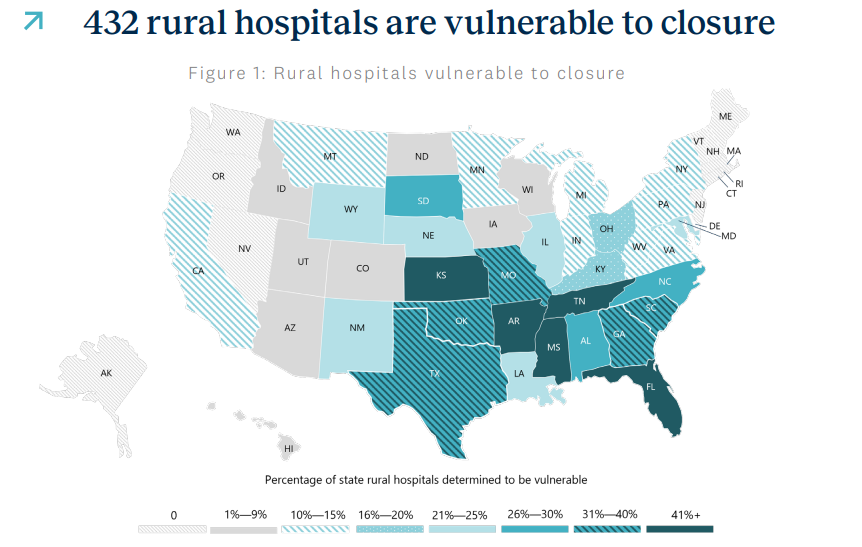
  • Over 400 rural hospitals are at a risk of closure

    source: Chartis 2025 “Rural Health state of the state”

    Why is that?

    • Smaller, aging populations mean lower patient volumes.
    • Heavy reliance on Medicare and Medicaid leads to thinner margins.
    • Workforce shortages drive up costs and limit service lines.
    • Closures of OB, oncology, and other departments reduce both access and revenue.

    The result: communities lose local care options, and hospitals struggle to remain anchors of health.

    At HealthOcta, we’re building VideoConsults to help rural hospitals retain patients, expand specialty coverage, and strengthen their long-term sustainability. We believe technology should reduce the pressure, not add to it.

    How VideoConsults helps here?

    Problem: Low patient volumes + service line closures make it hard to justify onsite specialists.
    VideoConsults helps by: Allowing rural hospitals to access specialists on-demand (cardiology, ID, endocrinology, etc.) without the fixed cost of hiring full-time staff. Patients can be kept local rather than transferred out.

    Problem: High transfer rates = lost revenue + fragmented care.
    VideoConsults helps by: Giving ERs and inpatient units a direct specialist connection. Many cases that would have been transferred can now be managed locally, keeping both revenue and trust in the community hospital.

    Problem: Workforce shortages, recruitment difficulty, and burnout.
    VideoConsults helps by: Extending the reach of the limited staff they do have. A single hospitalist can lean on specialty support, reducing decision fatigue and improving confidence in care.

    Problem: Financial pressure from payer mix and sustainability issues.
    VideoConsults helps by: Creating a flexible, scalable specialty access model that grows (or shrinks) with patient volume, no sunk cost in trying to sustain a low-volume service line.

    Problem: Community trust erodes when services vanish.
    VideoConsults helps by: Preserving access to advanced care close to home, reinforcing the hospital’s role as the anchor of the community.

    What makes VideoConsults unique in how we approach the solution…

    Unlike outsourced telehealth services, VideoConsults is not a replacement for your team, it’s an infrastructure layer that hospitals license and control. We’re a specialty access fabric that brings to you integrated devices, structured intake and telehealth tools. Add to it your own specialists or specialists you contract with. We even have a directory of specialists we could refer to you.

    • Clinical control stays local: Hospital leadership decides which specialists to connect, whether it’s their own employed physicians or contracted partners.
    • Flexible staffing: Rural hospitals can choose to partner with regional hubs, independent specialists, or IDNs, and swap or add partners without changing the platform.
    • Technology + compliance backbone: We bring structured intake, EMR-lite documentation, device integration, and even offer back-office support, but the hospital leads care delivery.

    Sustainable model: This puts community hospitals in the driver’s seat, they decide where to invest scarce resources while still ensuring specialty coverage.

    Too often, “tech solutions” create new problems – more workflows, more costs. For rural hospitals already stretched thin, that’s not sustainable. We built VideoConsults with a different principle: technology should lighten the load. By simplifying specialty access, reducing transfers, and fitting seamlessly into existing operations, our platform helps hospitals strengthen care without adding complexity or taking control away from leadership. In addition, VideoConsults is designed to be flexible for every budget. Tap to see more about the VideoConsults platform or talk to us about it.

  • Crushing the 2025 MCAT: What Top Scorers Did Differently (And How You Can Too)

    The MCAT isn’t just a test—it’s a make-or-break milestone for medical school aspirants. With the 2025 MCAT cycle now in the books, we analyzed the latest trends, scores, and strategies that helped top scorers stand out. If you’re serious about scoring a 515+ and getting into a competitive MD or DO program, this data-backed guide is your roadmap.

    1. More Students, Same Curve: MCAT Scores Are Holding Steady
    According to AAMC data, over 93,000 students registered for the MCAT in 2025, continuing the upward trend in test-taker volume. Yet, the average score remains steady at 501.5. Translation? The curve isn’t softening—you still need to outperform the competition.

    2. The 515+ Club: What Sets Top Scorers Apart
    Students who scored 515 or higher were more likely to:

    • Begin studying 6–9 months in advance
    • Use full-length AAMC practice exams (5+ tests)
    • Work with peer tutors or recently successful mentors
    • Track performance using third-party analytics tools (like Anki + UWorld dashboards)

    3. Strategy Is the Secret Weapon
    Top scorers didn’t just study hard—they studied smart. Instead of rote memorization, they:

    • Practiced active recall and spaced repetition (Anki)
    • Mastered CARS passage mapping and timing
    • Focused on understanding trends in bio/biochem, not just facts

    4. Test Anxiety and Burnout: A Rising Concern
    Reports from advising platforms and Reddit study groups show increasing numbers of high-performing students dealing with test anxiety and burnout. Many cite unrealistic timelines, poor mental health planning, and lack of support as contributors.

    5. Retake Rates and Gap Year Optimization
    Over 30% of students taking the MCAT in 2025 were repeat testers. The most successful second-time test-takers improved scores by 5–8 points on average by:

    • Reframing their prep plan with feedback
    • Seeking support from peers and MCAT mentors
    • Using structured review tools (AAMC Section Bank, Blueprint, UWorld)

    6. Peer Advising on the Rise
    The most effective trend of 2025? Peer-led guidance. Students who consulted peer mentors (often recent 520+ scorers) reported greater confidence, fewer avoidable mistakes, and stronger test-day performance.

    That’s where Pathways comes in. At Pathways, you don’t just get generic coaching—you get to speak directly with someone who just aced the MCAT and knows what it takes.

    Why Pathways Works:

    • No contracts or lock-ins
    • Choose your advisor based on their track record
    • Build a personalized plan by consulting multiple experts

    Conclusion:
    The 2025 MCAT cycle showed us that success is less about grinding and more about guidance. Whether you’re a first-time test-taker or planning a retake, aligning with experienced mentors is one of the smartest moves you can make.

    Call to Action:
    Ready to build your own MCAT prep dream team? Talk to someone who just crushed it.

    Book a Peer Advisor Now at Pathways

  • What Is Holistic Admissions—and Does It Help or Hurt Me?

    Each year, students with near-perfect test scores and glowing transcripts are rejected from top colleges. Meanwhile, others with slightly lower scores are admitted. If you’ve ever wondered how that happens, the answer lies in a concept called holistic admissions.

    But what does that really mean—and should you be excited or concerned about it?


    What Holistic Admissions Actually Means

    In a holistic admissions process, colleges evaluate the whole student—not just academic stats. That includes:

    • GPA and course rigor
    • Standardized test scores (if submitted)
    • Extracurricular activities
    • Personal essays
    • Letters of recommendation
    • Interviews
    • Background, life experiences, and context

    Rather than filtering candidates by a numerical threshold, admissions teams aim to understand how a student might contribute to the campus community as a whole person.


    Why Colleges Use This Approach

    Highly selective colleges often receive more qualified applicants than they can accept. Holistic review allows them to:

    • Assess character and potential, not just achievement
    • Diversify the student body by admitting those with unique stories or challenges
    • Value impact and initiative even if a student’s context limited access to resources

    In short, two students with the same GPA might receive different decisions based on how they got there—and what else they bring to the table.


    What Holistic Review Looks Like

    Let’s compare two fictional applicants to understand this approach:

    Applicant A:

    • 4.0 GPA
    • 1580 SAT
    • Captain of debate team
    • Volunteer hours
    • Generic essay about “working hard”

    Applicant B:

    • 3.8 GPA
    • 1460 SAT
    • Started a tutoring nonprofit
    • Works 20 hours/week to support family
    • Candid essay about resilience

    Who gets in? It depends on the school—but in a holistic process, Applicant B might have a strong edge. Admissions officers may view their accomplishments as more impressive, given the circumstances.


    Does Holistic Help or Hurt You?

    It helps students who:

    • Come from underrepresented or disadvantaged backgrounds
    • Have strong personal stories, leadership, or impact
    • Are late bloomers or had inconsistent transcripts due to valid reasons
    • Shine in interviews or essays

    It may frustrate students who:

    • Focused solely on academic perfection
    • Don’t have strong non-academic narratives
    • Feel “penalized” for coming from resource-rich schools without standing out

    But here’s the key: holistic review doesn’t ignore numbers—it adds dimension to them.


    So, How Do You Stand Out?

    1. Craft an authentic personal story in your essays.
    2. Pursue depth in your extracurriculars, not just breadth.
    3. Explain challenges honestly if they’ve shaped your academic path.
    4. Get strong letters from people who know you well.
    5. Be intentional about how each piece of your application fits together.

    🎓 Talk to Someone Who Just Did It—Successfully

    Want to know how students are navigating holistic admissions right now? At Pathways, we connect you with students who got accepted into top colleges in the past 12 months.

    Ask them:

    • What parts of their story mattered most?
    • What mistakes they avoided?
    • How they shaped a compelling narrative?

    👉 Book a consult with a recent admit — your first session is platform-fee-free.

    Holistic admissions isn’t about gaming the system. It’s about telling your story with clarity and confidence.

  • Pathways: Your Career Planning Companion from Middle School to Med School (and Beyond)

    Choosing a career path doesn’t begin at the end of high school — it starts much earlier. From middle school onward, students and their families face dozens of questions:
    What should we focus on? Which extracurriculars matter? Which advanced classes to take — and when? What does it take to pursue medicine, law, business, or tech?

    These questions are best answered by those who’ve walked the path before — high-achieving students, medical school admits, Ivy League grads, and expert advisors who’ve seen what works.

    Pathways gives you a front-row seat to real insight:
    ✅ Ask a question — get advice from students and pros who’ve done it
    ✅ Book a 1:1 consult when you need deep, tailored guidance
    ✅ Build your own panel of advisors as your child grows — from middle school all the way through college admissions
    ✅ No lock-ins, no long-term contracts — just honest, strategic guidance from people who’ve been there

    Whether you’re just starting to think about career options, or you’re deep in the application process, Pathways is your support team for every milestone — academic, strategic, and personal.

  • Introducing Snapcard’s Flexible Contact Tagging: Remember What Matters Most

    Last month, at a bustling tech networking event in San Francisco, CA, Priya Sharma, a freelance graphic designer and one of our beta test users, found herself juggling a whirlwind of new connections.

    Amid the flurry of handshakes and QR code scans, she met a potential client who shared her passion for spicy ramen and a knack for UX design. But a week later, as Priya scrolled through her Snapcard app, she struggled to recall those personal details that made their conversation click. “I knew his name and company,” she told us, “but the little things—his favorite food, his expertise, what school he went to — slipped my mind.”


    Priya’s story isn’t unique, many of us have felt this before and this ability to remember these small details about our contacts builds better connections with them. It’s exactly why Snapcard is rolling out our new flexible contact tagging feature, a game-changer designed to help you remember what matters most about your connections.

    At Snapcard, we’re obsessed with making networking effortless and meaningful for professionals like Priya—freelancers, entrepreneurs, sales pros, and anyone who believes relationships are the heart of success.

    Our personal CRM and digital business card platform already helps you keep your network “in orbit” with QR code sharing, smart reminders, and proximity alerts. Now, our latest feature takes contact management to the next level, letting you tag your connections with precision and personality, all while putting you, our users, at the center of the experience.

    A Smarter Way to Tag Your Connections

    With Snapcard’s new tagging system, adding memorable details to your contacts is as easy as a tap. When you meet someone new—say, at a trade show or a coffee chat—you can instantly tag them with descriptive labels that capture who they are and what makes them unique. Here’s how it works:

    • Choose from Intuitive Verbs: Select from a curated list of verbs like “Studied,” “Loves,” “Works,” “Expert,” or “Plays” to start your tag. For example, tag a contact as “Studied at Stanford,” “Loves Sushi,” or “Expert at Python” to jog your memory later.
    • Pair it with a tag: Select from our exhaustive library of tags Pair the verb with any tag you want. Met someone who’s a golf enthusiast? Tag them “Plays -> Golf.” Know a client who grew up in Chicago? Pair“Grew up -> Chicago.” The possibilities are endless.
    • Create Your Own Verbs: Need a verb that’s not on our list? Select “Add Another” in the dropdown, type your custom verb (e.g., “Mentors”), and use it immediately. While your new verb is available for your tags right away, it’ll be reviewed by our team for potential inclusion in our official verb list, ensuring our system evolves with your needs.
    • Create your tags too: Just the same was as you create verbs!

    This flexible approach means you can capture the quirks, skills, and stories that make each connection special, all within Snapcard’s sleek mobile app. Whether you’re tracking a colleague’s alma mater or a prospect’s favorite hobby, these tags fuel smarter follow-ups and deeper relationships.

    Customer-Centric Design in Action always

    Priya’s feedback, along with insights from thousands of Snapcard users, inspired this feature. “We heard loud and clear that users want a quick way to jot down personal details without cluttering their notes,” says Aisha Khanna, Snapcard’s Product Lead. “Our tagging system is built to be intuitive yet powerful, reflecting our commitment to putting users first.”

    The ability to add custom verbs via “Add Another” is a nod to Snapcard’s community-driven ethos. While we’ve curated verbs like “Loves,” “Hates,” and “Speaks” to cover 90% of what you’ll need, we know every networker is unique. By letting you propose new verbs—subject to our approval for quality and relevance—we’re co-creating a platform that grows with you. Already, beta testers have suggested gems like “Inspires” and “Collaborates,” which we’re considering for our list.

    Why Tagging Matters

    In a world where networking can feel fleeting, Snapcard’s tagging feature ensures no detail is forgotten.

    Tags power our Pro Plan’s smart search, letting you find contacts like “Expert at Marketing” or “Loves Hiking” in seconds. They also enhance reminders, so you can nudge yourself to reconnect with “Plays Tennis” before a local tournament. For Priya, tagging her client as “Loves Spicy Ramen” sparked a follow-up lunch that sealed a project deal. “It’s awesome to have Snap, it is getting me know my network better than I ever did,” she laughs.

    Plus, tagging ties into Snapcard’s way of keeping networking fun. Add tags to five contacts, and you’re on your way to earning a “Comet Badge” in our “My Orbit” dashboard. It’s just one way we reward you for building stronger connections.

    Privacy at Our Core

    True to Snapcard’s privacy-first promise, your tags are secure and never shared without your consent. We use AES-256 encryption to protect your data, ensuring your insights about “Hates Crowds” or “Speaks French” stay private. This commitment to trust sets us apart in a crowded networking space.

    Try It Today

    Whether you’re a freelancer like Priya or a sales pro juggling dozens of leads, Snapcard’s flexible tagging feature is here to make your network thrive. Download the app, start tagging, and see how easy it is to keep your connections in orbit. Have a verb idea? Add it and help shape Snapcard’s future.

    Get Started with Snapcard Now

    Got feedback? Email us
    Let’s build better relationships—together.

  • From Customer Feedback to Business Growth: How trustEngine Helps You Track Sentiment Trends

    If you run a coffee shop, a coworking space, or a service business like HVAC, landscaping, or mobile repairs, you already know that customer reviews are your most powerful marketing tool. But reviews aren’t just about star ratings — they’re signals. Embedded in that feedback is a rich stream of data about how your business is doing and where it needs to improve.

    The problem? Most small businesses collect feedback, but don’t analyze it. They’re sitting on a goldmine of customer sentiment, but they don’t have the tools to turn it into actionable insight.

    That’s where trustEngine comes in.


    Why Sentiment Trends Matter for Growth

    Reviews tell you more than whether someone had a good or bad experience. When analyzed over time, they reveal patterns and sentiment trends that can guide decisions in marketing, staffing, service improvements, and even pricing.

    For example:

    • Are more customers mentioning “long wait times” this month?
    • Is a particular staff member getting called out for excellence — or complaints?
    • Are your Google reviews improving after you rolled out a new policy?

    This isn’t just anecdotal. It’s data-driven insight — and small businesses that tap into this grow faster, retain customers longer, and make smarter investments.


    trustEngine Turns Feedback Into Strategy

    Here’s how trustEngine helps you move from passive feedback to active growth:

    📊 Sentiment Analysis Dashboard

    Every review, whether text or video, is automatically analyzed for positive, neutral, or negative sentiment. No manual tagging. No guesswork. Just clear, visual trends.

    🧠 Smart Tagging & Keyword Detection

    If 14 customers mention “dirty bathrooms” in your coffee shop in the past 60 days, trustEngine surfaces it. If “great customer service” spikes at one of your mobile locations, it flags that too — helping you amplify what’s working and fix what’s not.

    🧵 Trends Over Time

    Visualize how customer sentiment changes weekly, monthly, or seasonally. If your shared office space sees a dip in satisfaction every Monday morning, now you know — and can address it.

    🏆 Employee Insights (without surveillance)

    trustEngine can tie feedback to shifts or service logs (when integrated) to show which team members are driving positive reviews — giving you a fair, performance-based view without micromanagement.

    🛠️ Respond, Adapt, Improve

    Most businesses only respond when reviews are bad. With trustEngine, you can proactively:

    • Identify service friction points
    • Catch staff issues early
    • See how promotions or policy changes affect perception
    • And ultimately increase 5-star reviews without asking for them

    Case Example: How a Roofer Used Sentiment Data to Cut Refunds in Half

    A roofing company in Texas started using trustEngine’s sentiment dashboard to monitor job-site feedback. They noticed a spike in “missed appointments” and “rude communication” in reviews. The trend wasn’t obvious until they saw it visualized — and it traced back to one subcontractor crew.

    By replacing that team and tightening scheduling, they:

    • Reduced negative reviews by 43%
    • Cut refunds/chargebacks in half
    • Doubled 5-star reviews in the next 90 days

    That’s sentiment data in action — and growth driven by insight.


    trustEngine: Designed for Small Business, Priced to Win

    Unlike enterprise-grade tools that cost hundreds or thousands per month, trustEngine is built for small businesses, with transparent pricing under $100/month — including:

    • In-location video and text review capture
    • Automated sentiment tagging
    • Video SEO and social proof tools
    • Customer recovery workflows
    • And AI-powered reporting you can actually understand

    Final Word: Feedback Alone Doesn’t Drive Growth — Interpreting It Does

    If you’re already collecting reviews but not learning from them, you’re leaving growth on the table.

    trustEngine helps you move from anecdote to insight — from individual reviews to business-changing sentiment trends. Whether you’re a local service pro or managing a chain of coffee shops, this is how you turn customer voices into your most valuable strategic asset.


    🚀 Start tracking sentiment trends that actually help you grow
    Try trustEngine risk-free at trustengine.cc